IF YOU LIKE THIS POST PLEASE SHARE AND LIKE APKREVIEW4U =========>


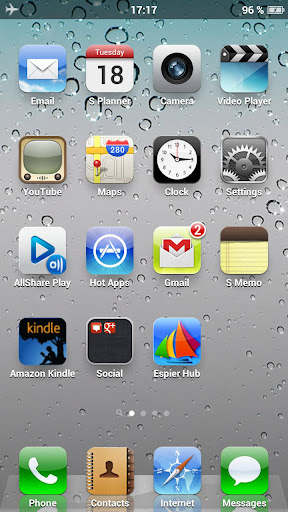 This is an iPhone style homescreen launcher.It actually does look like an iphone.The icons make it more precise and realistic iphone.It has got quite a few animations like the iPhone.It also replaces the status bar.(PAID FEATURE)
It also gives you a quick Search page for searching music,app,contacts,messages.It also searches the meaning of the word entered if you have a dictionary app installed.
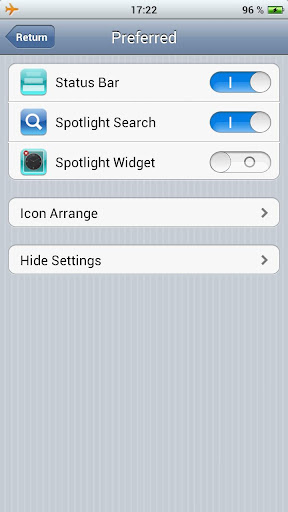 The dev has provided a Widget page to add any widgets or shortcuts you want.The search and the widget page can be enabled or disabled according to your wish.
You can hide unwanted apps from the screens and access them easily and quickly by Pinching out on the screen.(the way you do it to zoom in a picture).
The icons on the screen can be arranged in different ways like system priority, alphabetically,Installation time and Frequency of use.Or else you can arrange the icons yourself by draging and dropping the icons on the page you want.You can record the current arrangement and use it latter in case you phone restarts or crashes.
You can long press any icon on the screen to go into the edit mode and then you can hide or rename any app.You can also Drag and Drop the apps you want to be on the Dock Bar.
If you move your finger from bottom to top there appears a drawer with recently used apps.
Besides this it has got a Pad Switch feature in case you want the Look of an IPad on your android Tablet.
Most amazing thing is that you can use the Go launcher Ex themes for this launcher.

 This is an iPhone style homescreen launcher.It actually does look like an iphone.The icons make it more precise and realistic iphone.It has got quite a few animations like the iPhone.It also replaces the status bar.(PAID FEATURE)
It also gives you a quick Search page for searching music,app,contacts,messages.It also searches the meaning of the word entered if you have a dictionary app installed.
 The dev has provided a Widget page to add any widgets or shortcuts you want.The search and the widget page can be enabled or disabled according to your wish.
You can hide unwanted apps from the screens and access them easily and quickly by Pinching out on the screen.(the way you do it to zoom in a picture).
The icons on the screen can be arranged in different ways like system priority, alphabetically,Installation time and Frequency of use.Or else you can arrange the icons yourself by draging and dropping the icons on the page you want.You can record the current arrangement and use it latter in case you phone restarts or crashes.
You can long press any icon on the screen to go into the edit mode and then you can hide or rename any app.You can also Drag and Drop the apps you want to be on the Dock Bar.
If you move your finger from bottom to top there appears a drawer with recently used apps.
Besides this it has got a Pad Switch feature in case you want the Look of an IPad on your android Tablet.
Most amazing thing is that you can use the Go launcher Ex themes for this launcher.
WANT A COMPLETE IPHONE USER INTERFACE FOR ANDROID?

Comments
Post a Comment