Miui Expressions ROM for Gfit Review.(RHB ROMS)

Miui Expressions ROM  for Galaxy Fit GT-S 5670 Review.(RHB ROMS)

(Developer:
Aditya Fattepurkar(adityaf)


  One week with Miui expressions on My Galaxy fit I came to know all the pro's and bugs.
To describe the roms first impression I'd say it is super fast.It somehow accelerates your gfits speed.Sleek and smooth transitions.You get a bunch of preloaded apps .

It will not upgrade your firmware as it is just a different UI.That means you still have to be on the same old Gingerbread but yes not the boring Touch wiz .Surprisingly it shows that your fit has 512 MB RAM and a 700Mhz CPU but in reality gfit has a 280mb of RAM and 600Mhz CPU.

Now talking about the bunch of features in it.It has a classic minimalistic look and feel.
It comes with 5 different lockscreen styles/themes and more themes can be downloaded any time.
The homescreen launcher also has a loads of customization options like setting app grid size and a few amazing screen  transitions are also available.
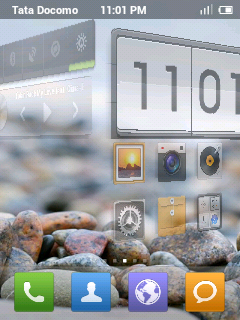
Screen Transition

The Extended Settings allows you to play with the colour scheme of the UI.It doesn't have the regular. APP DRAWER by default.It needs to be activated from the extended settings.
The Launcher does not allow much customization,but you can try different themes.
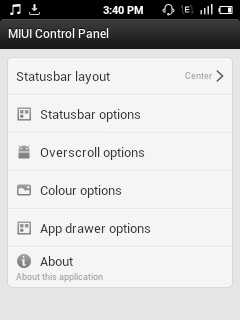

Extended Settings

 It has the familiar drop down status bar but with a new style. It has towing pages..one is the notifications and the other is the Toggles.The toggles can be kept in the form of a vertical row or Page.
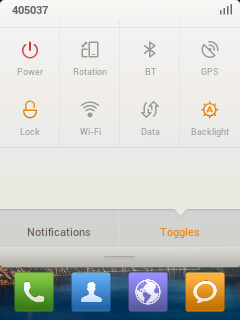
Dropdown Status Bar Toggles Page


  The Gallery app is also Good.The screen shot is shown below.


The dialer is simple and clean.

Messaging application.
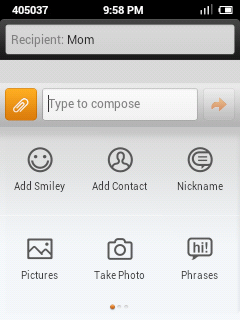
This app is amazing.It has got this attachment buttom to the left of the message box.You can add pics,contacts from contact list,nicname of the reciepient,audio,video,Smiley etc.The smiley has many more options.
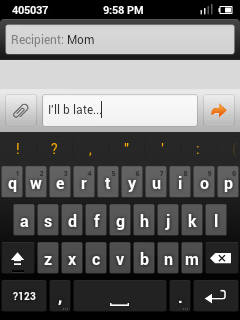
Keyboard With Predictive suggestions.


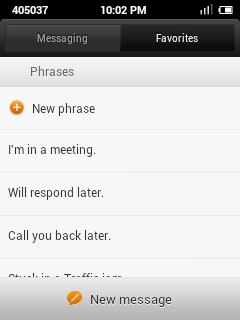
Add Phrases In Messages

Adding Widgets on homescreen is fast and easy.Long Touch screen opens the Add or Edit widget option.It comes with number of widgets.


BUGS AND HOW TO CURE THEM.

It doesn't have too many bugs although it created few major problems.
1)Google sync is not working.(Cured By reflashing)
2)Messaging app force closes all the time.(Cured By reflashing)
3)Root is lost.
4)Camera app force closes occasionally.(Cured By reflashing)
5)Can't import contacts from vcf file.(Still Persists after reflashing)
6)Reboots when Wifi is toggled.(major bug)
It is not necessary that you will definitely face these bugs.These are the problems that I faced.
Most of the bugs are cured by Re-flashing the Rom.
The lost root access can be regained by flashing Superuser-3.1.3-arm-signed.zip through recovery.

HERE IS THE LINK.
http://hosted.androidsu.com/superuser/



DOWNLOAD THE ROM HERE


WANT TO SEE AOKP V9 NIGHTLIES ROM FOR GFIT REVIEW?


Comments

Popular posts from this blog

How to Optimize Android Performance Using Hidden Developer Options

Speed Up Your Android: Simple Developer Settings to Try Today.  If your Android phone sometimes feels sluggish or doesn’t respond as quickly as you’d like, there’s a set of hidden tools built into the system that most users never touch. These are the Developer Options — a menu Google originally meant for programmers, but which also includes powerful tweaks that can make your phone feel faster and more responsive. Before we dive into specific settings, you first need to unlock this hidden menu. To do that, open Settings → About Phone , find the Build Number , and tap it seven times . You’ll see a prompt confirming you’re now a developer. Then return to the main Settings page and look for Developer Options — it may be under System or Additional Settings depending on your phone. Make Animations Feel Faster One of the easiest ways to change how fast your phone feels is by adjusting its animations. Android uses subtle motion when you open apps, switch screens, or interact with men...

How to use What's App on PC?

  What's app is an amazing cross platform messaging application available for mostly every kind of device ranging from a high end smartphones to a low end keypad phones. Prerequsites: 1)PC 2)Bluestacks App Player 3)Active Internet Connection STEP 1: Download Bluestacks App Player From here. STEP 2: Set Up a Google account.Go to settings>Accounts And Sync>Add Account>Google STEP 3: After finishing the Account setup.Open the Play store>Search for Whats app>Download and install Whats App. STEP 4: Open What's App>Agree and Continue>Select Your Country>Enter Your Phone Number STEP 5: The SMS Verifiacation will not Work.Don't worry Go for Voice Verification.Select 'Call Me'. STEP 6: Enter the activation Code which the lady tells you  in the Call in the space provided. And now the Verification is done. You can now send millions of messages to your friends.Make sure you have the all your contacts in Bluestacks.

HOW TO FLASH CWM RECOVERY ON GALAXY FIT GTS 5670?

A STEP BY STEP GUIDE TO FLASH CWM RECOVERY ON GALAXY FIT USING ODIN MULTI DOWNLOADER. __________________________________________________________________________________ NOTE: BY DOING THIS YOUR WARRANTY IS GOING TO GET VOID.FOLLOW EACH STEP CAREFULLY.IF YOUR PHONE GETS BRICKED I WILL NOT BE HELD RESPONSIBLE.YOU ARE DOING THIS AT YOUR OWN RISK. __________________________________________________________________________________ STEP 1) Download this file. CWM.RAR   PassWord: zonealpha STEP 2) Extract the files.Open Odin Multidownloader. STEP 3) Then put your phone in download mod by long pressing = volume down + home key + lock key. STEP 4) Connect  phone to your pc. STEP 5) It must be detected by odin. STEP 6) Click on Select OPS and navigate to the  BENI_v1.0.ops and select it. STEP 7) Now Check the ONE PACKAGE box and Select the Package file" beni_cwm-5_ext4_v2.tar". STEP 8) Click START. Let the recovery be installed. WANT TO KNOW HOW TO FLASH ROMS ON GALAXY FIT...