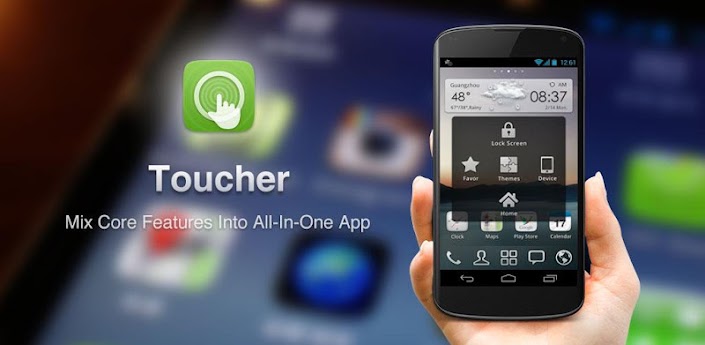

Toucher-Another masterpiece by GoDEV team.


   Android introduced the drop down status bar feature which became a quick access to the nutshell with all its toggles and Notifications.But for GO DEVS it wasn't enough.They wanted more functionalities at a distance of a touch.So they made Toucher-a unique app which brings a bunch of regularly used features at a finger touch.
    It is similar to the quick launch that you have on the windows phone task bar.It brings most of the frequently used apps like Dialer,call logs,time,day -date,contacts ,screenshot shortcut and many more in a handy manner.
    It provides a little transparent bubble which rests on your screen no matter in which app you are or on what page of homescreen you are.It remains stationary at its position.You just have to touch the bubble to access the bunch of Toucher features.

    Toucher comes with a default theme which is a simple black box which appears at the centre of the screen.It can be easily configured according to one's wish and use.Although personally i dint like the default theme.Presently there are 4 more themes available in addition to the default theme.They are
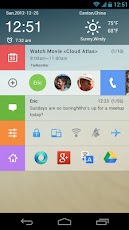
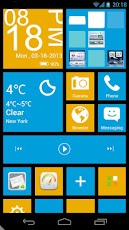
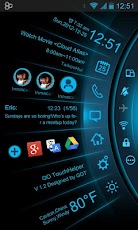
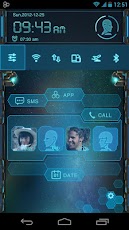

All these themes are full page themes unlike the default theme which is a page centered one.

For weather an additional widget is to be downloaded separately named as GO Weather Forecast & Widget

This weather widget is amazing.You'll love its graphics and features like real time weather and temperature. The background of the weather page changes according to the weather like of it is raining then a background with water droplets on the screen pops up.

Comments

Popular posts from this blog

HOW TO FLASH CWM RECOVERY ON GALAXY FIT GTS 5670?

A STEP BY STEP GUIDE TO FLASH CWM RECOVERY ON GALAXY FIT USING ODIN MULTI DOWNLOADER. __________________________________________________________________________________ NOTE: BY DOING THIS YOUR WARRANTY IS GOING TO GET VOID.FOLLOW EACH STEP CAREFULLY.IF YOUR PHONE GETS BRICKED I WILL NOT BE HELD RESPONSIBLE.YOU ARE DOING THIS AT YOUR OWN RISK. __________________________________________________________________________________ STEP 1) Download this file. CWM.RAR   PassWord: zonealpha STEP 2) Extract the files.Open Odin Multidownloader. STEP 3) Then put your phone in download mod by long pressing = volume down + home key + lock key. STEP 4) Connect  phone to your pc. STEP 5) It must be detected by odin. STEP 6) Click on Select OPS and navigate to the  BENI_v1.0.ops and select it. STEP 7) Now Check the ONE PACKAGE box and Select the Package file" beni_cwm-5_ext4_v2.tar". STEP 8) Click START. Let the recovery be installed. WANT TO KNOW HOW TO FLASH ROMS ON GALAXY FIT...

iOS 7-REVAMPED iPhone.

        Today Apple announced its new generation phone OS the iOS 7.It is the 7th successor of the previous OS'ss and is the most different of them all.If you take a look at all the 7 iOS's side by side this version stands out differently.It has completely redesigned the old look of the idevices. Although i think that apple has tried to copy features from Android and BB.Rather they not only copied the features but gave them a more stunning look. iOS 7 has brought about significant changes in the design of each and every famous feature of the previous iOS's.They have tried to make it more and more user friendly. The older features like the keyboard,the font,the homescreen wallpapers, the messaging apps,The safari browser and all the old cool stuff is now even cooler. KEYBOARD: The older keyboard was a dark grey background with big light grey buttons and bold letters and now it has a creamy white background and pure white keys with non bold letters. THE SAFARI BRO...

3D Digital Weather Clock

    Best 3D Digital clock available in the android market FOR free.Amazing graphics with extremely useful functions ,this app comes with a digital clock and also shows battery percentage,date,day and month along weather and temperature of selected area.Uses Data network to get the updates about temp and weather. Animations are as good as the one available in Beautiful Widgets Clocks.You can set the "ON CLICKS" i.e the apps that should open when you click certain parts of the widget called HOTSPOTS For eg: When you click on the Minutes shown on clock the alarm app should open.This should be configured before adding the widget. Some Hotspots are shown below Once you add it you cannot change the settings. ABOUT THIS APP REQUIRES ANDROID: 1.5 and up SIZE: 1.7M PRICE: Free CONTENT RATING: Everyone