
Concept Key Lime PIE


    Android OS is being developed at a very rapid rate.In the year 2009 android OS went into 3 upgrades.In 2010 Google launched its 2 new versions.The year 2011 was a boon for the OS development.With millions of Developers and millions of apps already developed the 2011 year was really a big milestone in android history.But the growth continues.Last year 2012 witnessed the latest and the most powerful update Jelly Bean.It is the 2nd most used versions of android after Gingerbread.

  But since last 8 months no new version was launched.Google is trying the best to COOK its next big boon in android history.The next expected version of Android is going to be named 'KEY LIME PIE'.The news of its development  new features , revisions in old features have been a key topic of discussions among tech enthusiasts for a long time now.

  Many People expressed their expectations through various apps.In this post i am going to tell you about the most promising UI that a developer has conceptualized.


VersionCode nameRelease dateAPIlevelDistribution (June 3, 2013)
4.2.xJelly BeanNovember 13, 2012174.0%
4.1.xJelly BeanJuly 9, 20121629.0%
4.0.xIce Cream SandwichDecember 16, 20111525.6%
3.2HoneycombJuly 15, 2011130.1%
3.1HoneycombMay 10, 2011120%
2.3.3–2.3.7GingerbreadFebruary 9, 20111036.4%
2.3–2.3.2GingerbreadDecember 6, 201090.1%
2.2FroyoMay 20, 201083.2%
2.0–2.1EclairOctober 26, 200971.5%
1.6DonutSeptember 15, 200940.1%
1.5CupcakeApril 30, 200930%

Concept key lime pie HD 7 in 1

This app is a theme for many different home screen launchers including Nova,Apex,Go launcher,Holo Launcher and ADW.
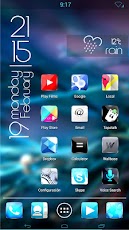

     The best thing about this theme is that it works with a bunch if different famous launchers.The next good thing about Concept KLP is that it comes with some amazing HD wallpapers and exeedingly fantastic icon set.The icons as you see have a little 3D glass kind of effect which makes it look elegant and KLP material.Seriously...!!!
 In the above shown screenshot the deveoper has used a Vertical Clock widget.I could'nt find it anywhere on the net so i decided to like.. create it on my own. 

 I have used UCCW app to create an exact replica of the above used clock.You can DOWNLOAD it 

This theme is a paid theme .It costs about $1.It is 12 Mb in size so make sure you have a fast internet connection. 

For installation procedures for different launchers make sure you read the description provided by the dev.

It is compatible with any android device that runs Android 2.0 and above.Which is piratically all the devices today.

Comments

Popular posts from this blog

How to Optimize Android Performance Using Hidden Developer Options

Speed Up Your Android: Simple Developer Settings to Try Today.  If your Android phone sometimes feels sluggish or doesn’t respond as quickly as you’d like, there’s a set of hidden tools built into the system that most users never touch. These are the Developer Options — a menu Google originally meant for programmers, but which also includes powerful tweaks that can make your phone feel faster and more responsive. Before we dive into specific settings, you first need to unlock this hidden menu. To do that, open Settings → About Phone , find the Build Number , and tap it seven times . You’ll see a prompt confirming you’re now a developer. Then return to the main Settings page and look for Developer Options — it may be under System or Additional Settings depending on your phone. Make Animations Feel Faster One of the easiest ways to change how fast your phone feels is by adjusting its animations. Android uses subtle motion when you open apps, switch screens, or interact with men...

How to use What's App on PC?

  What's app is an amazing cross platform messaging application available for mostly every kind of device ranging from a high end smartphones to a low end keypad phones. Prerequsites: 1)PC 2)Bluestacks App Player 3)Active Internet Connection STEP 1: Download Bluestacks App Player From here. STEP 2: Set Up a Google account.Go to settings>Accounts And Sync>Add Account>Google STEP 3: After finishing the Account setup.Open the Play store>Search for Whats app>Download and install Whats App. STEP 4: Open What's App>Agree and Continue>Select Your Country>Enter Your Phone Number STEP 5: The SMS Verifiacation will not Work.Don't worry Go for Voice Verification.Select 'Call Me'. STEP 6: Enter the activation Code which the lady tells you  in the Call in the space provided. And now the Verification is done. You can now send millions of messages to your friends.Make sure you have the all your contacts in Bluestacks.

HOW TO FLASH CWM RECOVERY ON GALAXY FIT GTS 5670?

A STEP BY STEP GUIDE TO FLASH CWM RECOVERY ON GALAXY FIT USING ODIN MULTI DOWNLOADER. __________________________________________________________________________________ NOTE: BY DOING THIS YOUR WARRANTY IS GOING TO GET VOID.FOLLOW EACH STEP CAREFULLY.IF YOUR PHONE GETS BRICKED I WILL NOT BE HELD RESPONSIBLE.YOU ARE DOING THIS AT YOUR OWN RISK. __________________________________________________________________________________ STEP 1) Download this file. CWM.RAR   PassWord: zonealpha STEP 2) Extract the files.Open Odin Multidownloader. STEP 3) Then put your phone in download mod by long pressing = volume down + home key + lock key. STEP 4) Connect  phone to your pc. STEP 5) It must be detected by odin. STEP 6) Click on Select OPS and navigate to the  BENI_v1.0.ops and select it. STEP 7) Now Check the ONE PACKAGE box and Select the Package file" beni_cwm-5_ext4_v2.tar". STEP 8) Click START. Let the recovery be installed. WANT TO KNOW HOW TO FLASH ROMS ON GALAXY FIT...