


Although i think that apple has tried to copy features from Android and BB.Rather they not only copied the features but gave them a more stunning look.
iOS 7 has brought about significant changes in the design of each and every famous feature of the previous iOS's.They have tried to make it more and more user friendly.
The older features like the keyboard,the font,the homescreen wallpapers, the messaging apps,The safari browser and all the old cool stuff is now even cooler.
KEYBOARD:
The older keyboard was a dark grey background with big light grey buttons and bold letters and now it has a creamy white background and pure white keys with non bold letters.

THE SAFARI BROWSER:
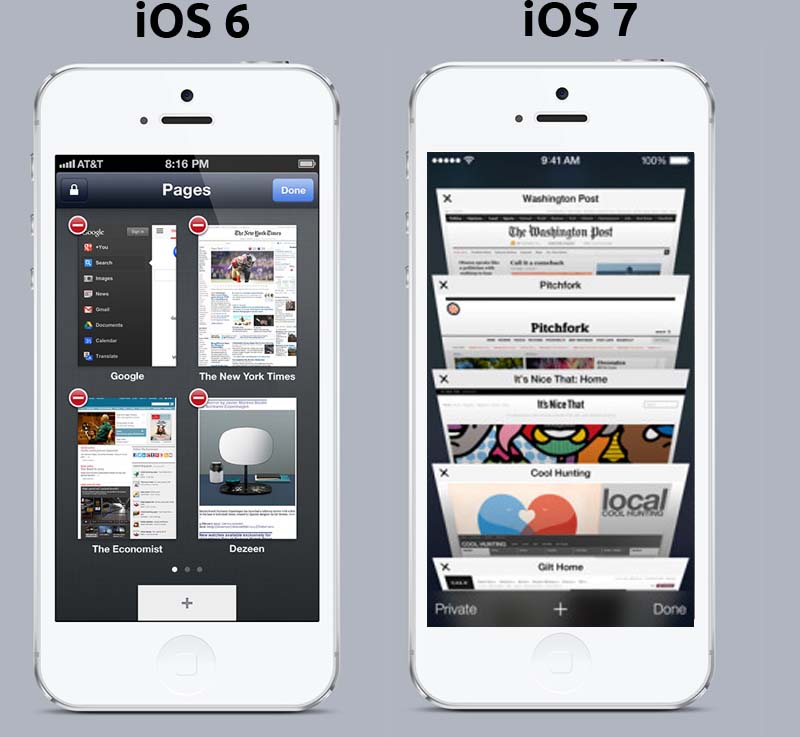
Safari unlike before opens in a full screen mode which gives a wide view of the websites you visit.The new feature i liked in the new safari is the TABS.This time the tabs appear as vertical carousal which you can slide up or down and select the tabs.You can now have any number of tabs open at a time unlike earlier in which you could open just 8.
CAMERA:
The camera has also been revamped this time.You can change modes just by sliding your finger left or right.Real time FX and many more cool features are introduced.It categorizes the pictures you take according to place occasion and time taken automatically.

SIRI:
The new SIRI has become smarter than before.Now it can speak with you in different voices including new male voices.It can also be told to toggle setting like Bluetooth and Wifi or brightness.It has a new interface too.It is now integrated with twitter and wikipedia,.

LOCKSCREEN:
The old 'Slide to unlock' lockscreen has now changed.It also comes with a drop down notification center that is much similar to the androids drop down status bar.

NEW FEATURES:
CONTROL CENTER:
This works as the name says, it controls all the basic things of you idevice like adjusting brightness toggle Bluetooth,Wifi,Rotation and airplane mode.It appears on the screen by pulling it up from the bottom of the device.It also has a quick music player and shortcut to apps like clock,calculator,camera and also flashlight.
The airdrop (covered later in the post) can also be toggled here.
MULTITASKING TRAY:
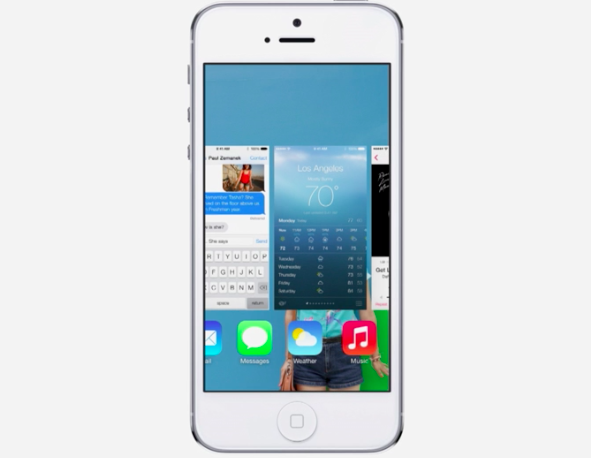
This is a feature that all android 4 guys are familiar with.It is same as the multitasking tray in android.You can access it by double tapping your homescreen .It has become easy to jump between apps and kill them when not in use just by pushing them up.
AIRDROP:
You can share files with your friends just by tapping on their faces.Also sharing is possible with unknown contacts by toggling the 'EVERYONE' option.Airdrop uses your wifi ad-hoc network.

iTUNES RADIO:
This was the much awaited feature of the iOS7.You can now listen to thousands of songs and buy them from iTunes.You can create you own radio channel.You can browse as many stations and select the appropriate song you want.
Comments
Post a Comment