
Another new smartphone OS has been released by the Mozilla.Yeah the same company which has developed a Web Browser.Actually the Os also has its name same as the browser and is called "Firefox OS" a.k.a B2G(Boot to Gecko).
This Os is supposedly going to run on both mobile phones and tablets computers.It is like Android a Linux based open source OS.This OS's has its coding on simply yet powerful coding languages HTML 5,CSS,JAVA SCRIPT and C++.This makes its development easy to learn.
Mozilla demonstrated its working on a Android running device.At present their are no FOS devices in the Market although ZTE,LG,TCL and other such companies are looking forward to release a FOS based device.
As there is no device launched yet Mozilla released a FOS emmulator to attract a lot of mobile geeks and devs.
DETAILED OVERVIEW OF THE FIREFOX OS

1)THE HOMESCREEN.
This is the Homescreen of the OS.It is simply and serene looking.It has stagnant clock and Day and Time resting on this screen.

 Like any other OS it has its Dock at the bottom of the screen with 4 icons namely Dialer,Messaging,Contacts and Browser.
Unlike android they are non movable and irreplaceable.
It has 3 more pages among which two are for apps and one his a handy search page which lets you search the content in your phone as well as on the Marketplace and the whole world wide web.
2)STATUS BAR
This feature is taken from the Android OS.It is a standard Android like Pull down status bar.It features the toggles and a shorcut to settings and the notifications.
This toggles are at rest too.They cannot be changed or replaced.
3)APPLICATIONS:
a)Dialer:
 Simple and clean Dial pad with bold numbers.A shortcut to add new contact beside the green call button.
The 3 more options at the bottom viz.Call logs,Contacts and dialer itself.
b)Messaging app

c)Browser
Fast and easy navigation.A slider on the side for tabs.That's a good idea because when you keep tabs option near the close option it sometimes is mistouched.


d)Gallery
Gallery looks a lot like the Android Jelly Bean gallery.The new feature in this is a on spot editing of images.To zoom the pic you have to double tap it.I couldn't check if it has Pinch to zoom feature for OBVIOUS REASONS.Editing options are for simple editing like exposure settings,few effects and crop picture and all that.


e)The MarketPlace.
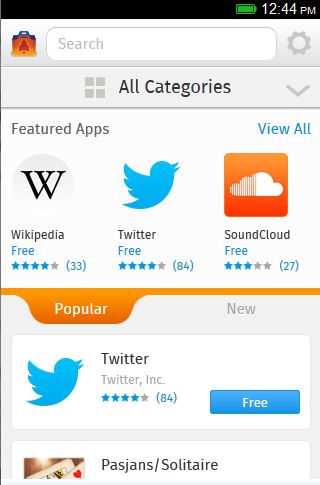
Clean Ui.The Most popular and new apps are at a touch's distance.
4)TASK MANAGER
 The android 4+'s feature the Task Manager is also present in the FOS.
Comments
Post a Comment